The Plug&Brand Vault app
FREE
A place to keep often-used prompts and reference images handy for a smooth drag and drop experience.
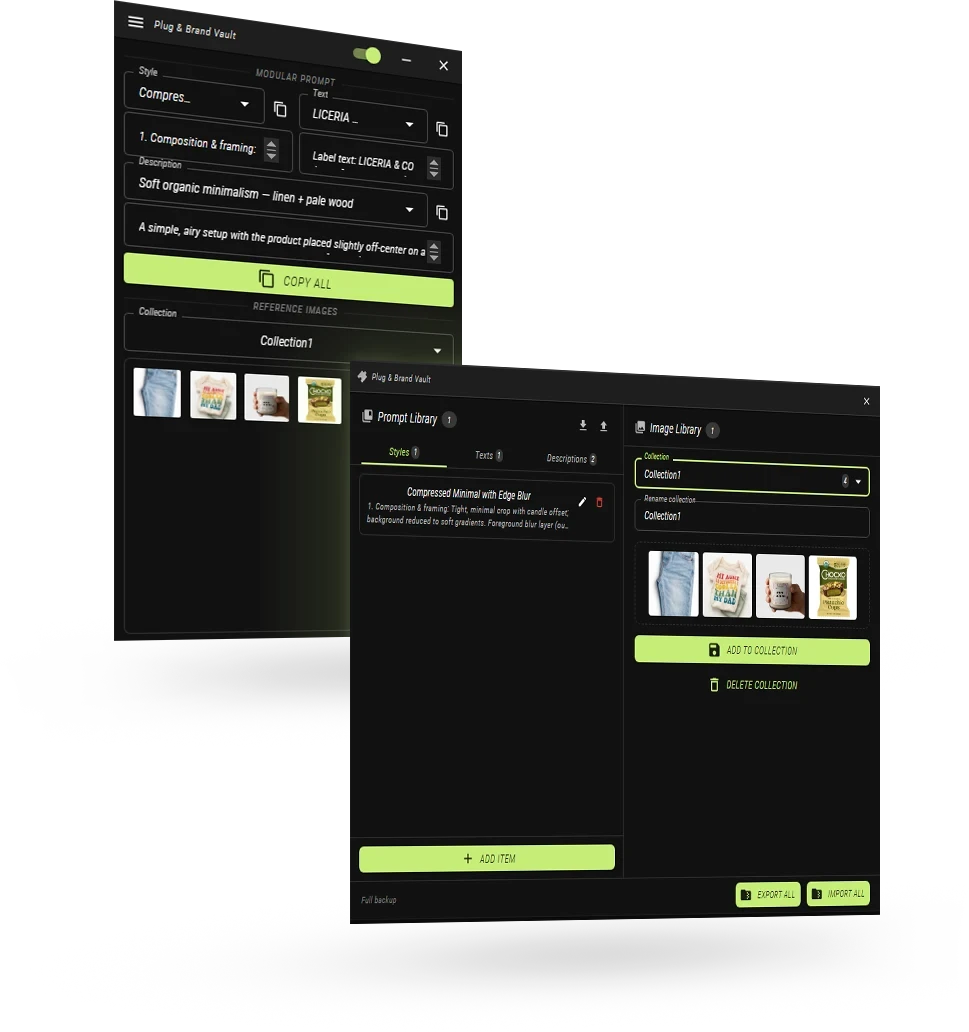
What’s inside the Vault
01 / TEXT PROMPTS
Build prompts from reusable parts.
Save styles, descriptions, product context, and label copy as modular blocks. Mix and match them, then copy the full prompt or each part as you need it.
02 / REFERENCE IMAGES
Keep visual context close.
Organize references into collections for products, campaigns, and clients. Select one or several images, then drag them straight into your creative tool.
A simple workflow for better prompts.
01
Save the building blocks.
Store styles, descriptions, product context, and label copy as separate prompt parts.
02
Combine what fits.
Choose the prompt parts and reference images that belong to the same visual direction.
03
Copy or drag into your tool.
Use COPY ALL for a complete prompt, copy individual fields, or drag selected images directly into your platform.
ADD TO LIBRARY
Put the right things within reach.
The Vault is designed around two small habits: save the pieces you repeat, then keep the references you reach for close.
PROMPT LIBRARY
Add a Style, Text, or Description.
Open the relevant tab, choose ADD ITEM, and give the prompt a title you will recognize later. The value field can hold multiple paragraphs. Edit with the pen icon; delete with the red bin.
IMAGE LIBRARY
Make collections for the work ahead.
Choose New Collection, name it, then drag and drop images into the drop area. Select multiple references, click a selected image to unselect it, and hover to remove one.
Ready when you are.
The Vault is free to download. No card required.